外观
c#中httpclient的get简单运用
HttpClient是一个非常方便的,可异步get/post的HTTP 应用程序的编程接口。
如何使用HttpClient?
第一步、导入System.Net.Http命名空间
第一步、导入System.Net.Http命名空间第二步、实例化一个HttpClient
HttpClient Client = new HttpClient();第三步、发送get请求
string url = "https://www.uudd.top";
string response = null;
HttpResponseMessage httpResponseMessage = await Client.GetAsync(url);
第四步、获取响应结果及内容
// http响应成功
if (httpResponseMessage.IsSuccessStatusCode)
{
    response = httpResponseMessage.Content.ReadAsStringAsync().Result;
}
完整get请求demo代码
using System;
using System.Net.Http;
using System.Threading.Tasks;
namespace 控制台
{

    public class Program
    {
        static void Main(string[] args)
        {

            Func func = new Func();
            // http响应内容
            string content = func.GetHtml().Result;
            // 对响应内容进行判断
            if (!string.IsNullOrEmpty(content))
            {
                // 打印获取的内容
                Console.WriteLine(content);
            }
            else
            {
                Console.WriteLine("请求失败!");
            }

        }

    }

    public class Func
    {
        private static HttpClient Client = new HttpClient();
        public async Task<string> GetHtml()
        {
            string url = "https://www.uudd.top";
            string response = null;
            HttpResponseMessage httpResponseMessage = await Client.GetAsync(url);
            // http响应成功
            if (httpResponseMessage.IsSuccessStatusCode)
            {
                response = httpResponseMessage.Content.ReadAsStringAsync().Result;
            }

            return response;
        }

    }
}
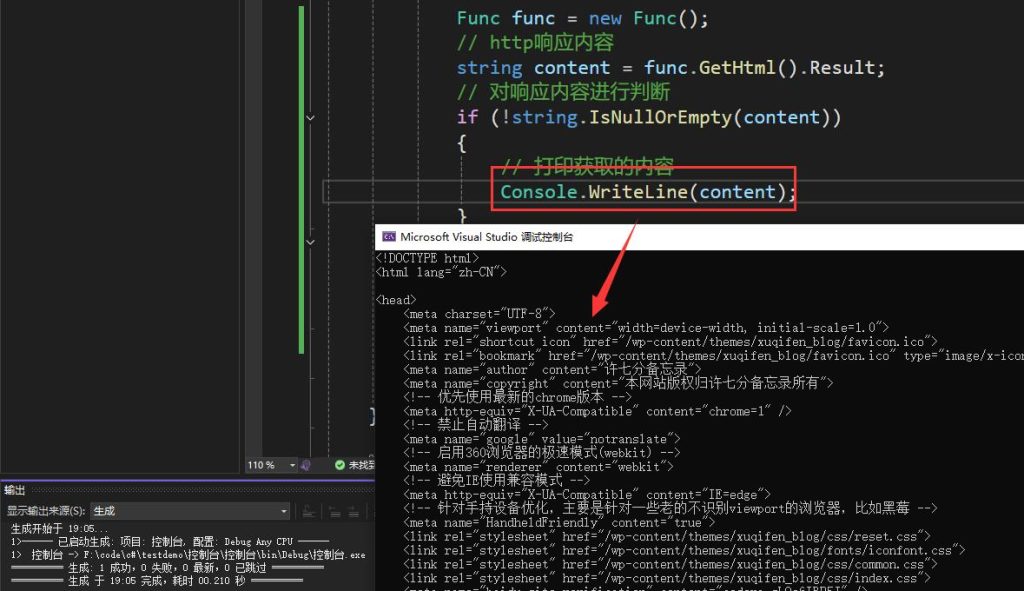
http响应成功后效果