
外观
js遮罩层,点击弹出“伪页面”
自己动手做个简易的遮罩层,当用户点击元素,比如button按钮时候,弹出伪页面。
遮罩层原理
实际是一个div区域块,不点击的时候是隐藏状态,display的值是none.
遮罩层效果
以下是我们今天要做的简易的遮罩层效果。
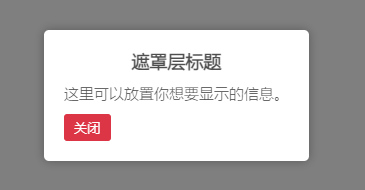
遮罩层制作步骤
一、制作HTML部分
<div class="overlay">
    <div class="popup-content">
        <h2>遮罩层标题</h2>
        <p>这里可以放置你想要显示的信息。</p>
        <button class="close-button">关闭</button>
    </div>
</div>
二、制作CSS部分
<style>
        /* 遮罩层样式 */
        .overlay {
            display: none;
            position: fixed;
            top: 0;
            left: 0;
            width: 100%;
            height: 100%;
            background-color: rgba(0, 0, 0, 0.5);
            justify-content: center;
            align-items: center;
        }

        /* 弹出内容样式 */
        .popup-content {
            background-color: white;
            padding: 20px;
            border-radius: 5px;
            align-items: center;
            box-shadow: 0 0 10px rgba(0, 0, 0, 0.3);
        }
        .popup-content h2{
            margin-bottom: 10px;
            font-size: 18px;
            font-weight: bold;
            text-align: center;
        }

        /* 关闭按钮样式 */
        .close-button {
            margin: 10px auto 0;
            padding: 5px 10px;
            background-color: #DC3545;
            color: white;
            border: none;
            border-radius: 3px;
            cursor: pointer;
        }
    </style>
三、制作JS部分
<script>
        // 获取触发按钮、遮罩层和关闭按钮元素
        const triggerButton = document.querySelector('被点击的元素选择器');
        const overlay = document.querySelector('.overlay');
        const closeButton = document.querySelector('.close-button');

        // 为触发按钮添加点击事件监听器
        triggerButton.addEventListener('click', function () {
                overlay.style.display = 'flex';
            });

        // 为关闭按钮添加点击事件监听器
        closeButton.addEventListener('click', function () {
                overlay.style.display = 'none';
            });
    </script>